




First-Year (Freshman) Advising
CSULB requires all first-year students to receive academic advising in their first year (Fall and Spring semesters). If you do not receive academic advising during the Fall and Spring terms, your registration hold will not be lifted. More information about the university policy on First-Time, First Year advising can be found on the Undergraduate Advising Resources page.
First-Year Mandatory Advising will take place during the months of February and March. You will meet your advising requirement, based on the guidelines outlined by your major.
Before completing your First-Year (Freshman) Mandatory Advising, please complete the following steps:
- Verify your major.
- Advising workshops are major-specific. If you are planning to change your major, please do so as soon as possible so you are given the appropriate instructions for completing your advising requirement. If you change your major after completing your advising requirement, you will need to follow the guidelines for the new major and do the advising requirement again.
- If you are unsure of your major, log in to Single Sign On and click on MyCSULB student center
- Click on "My Academics"
- Your major/pre-major will be listed under "Current Academic Objective" on the right side of the page.
- If you wish to change to a different CHHS major, please visit our Major, Minor, and Certificate Requests webpage.
- If you wish to change toa major outside of CHHS, please reach out to the college advising center for the major you want to pursue.
- Verify that all test and/or transfer credit is posted.
- To ensure we are advising you accurately, please make sure all AP/IB and/or college credit is posted to your record before attending your advising session.
- To verify your credit, log in to Single Sign On and click on MyCSULB student center.
- Under your Academics section, click on "My Academics"
- Click on "Transfer Credit Report" from the Academics expandable menu (button is located in the upper right of the panel = small gray box with three yellow stacked lines) to view what credit is currently in your account.
- If any credit is missing from your transfer credit report, please submit your records to Enrollment Services immediately. Please visit the First-Time, First-Year Student Test and Transfer Credit webpage for more information on how to transfer your credit.
- If you already sent your scores and you do not see them in the system, please connect with an academic advisor for further assistance.
- CHHS first-year students that started at CSULB in Fall 2025 will be required to complete the following components to satisfy their advising requirement:
- Register & participate in your mandatory advising workshop
- Submit a tentative Fall class plan
- You will be emailed information to register for an advising workshop for your specific major to your CSULB student email account, so please check your CSULB email!
- In your advising session, your advisors will go over:
- Important major specific information
- Create your tentative Fall schedule
- How to declare into your major
- Important tips and tools for your future success
- During the workshop, you will use the tools learned to submit a proposed Fall class plan via an online module. An advisor will review your schedule/plan to ensure you have selected the appropriate courses.
- If you have any questions for your advisor, please be sure to ask them during your advising session.
*Exception: Pre-Nursing and Pre-Social Work majors will be required to complete an online module instead of a workshop. Please check your CSULB student email for further instructions
- Major Specific Degree Requirements (MSDR): A set of required courses and GPAs that must be met to officially declare into the major.
- Pre-Major: A student who is not officially in the major but is planning to pursue the major. Students must meet MSDR to officially declare into the major.
- Students must declare a major by 60 units to avoid getting a hold on their account.
- Declared Major: A student who is officially declared in the major, either from the admissions process or by meeting the MSDR for their major.
- Lower Division: Any course numbered 100 to 299 level.
- Example: ENGL 100B
- Upper Division: Any course numbered 300 to 499 level.
- Example: CLSC 300
- Enrollment Appointment: The assigned date and time you can register for courses for the upcoming semester. Your enrollment appointment is sent to you via email and is posted to your MyCSULB student center each term.
- Prerequisite: A course that must be completed before enrolling in another course.
- Example: MATH 112A must be completed before MATH 112B.
- Corequisite: A course that must be completed before or at the same time as another course.
We always recommend meeting with an advisor to discuss university policies and how they may affect your individual record. Visit us during Drop-In Advising if you are considering using one of the following policies or want more information.
- Educational Leave: An educational leave allows you to take time off from CSULB without having to reapply to the school. You may visit the Educational Leave Website for more information, which includes eligibility criteria, helpful workshops and how to request a leave. Check with your CHHS advisor to discuss the impact of an educational leave and plans for when you return. Keep in mind that you are not eligible for an educational leave until you have earned CSULB credit.
- Repeating Courses: If you earn a "D","F", or “WU” in a course, you have the option to repeat the class. In order to be eligible for grade forgiveness, you must retake the course at CSULB and pass the second attempt with a C or better. You cannot repeat courses that you earn a "C" or better in. If you are not passing courses that you are currently enrolled in, it may be in your best interest to repeat those courses in the following semester. Speak with your CHHS advisor to go over options!
- Withdrawing: Withdrawals allow you to get out of a course after the drop period ends on MyCSULB Student Center. These require multiple levels of approval and can affect your financial aid and graduation timeline. Always consult with your CHHS advisor before withdrawing from courses.
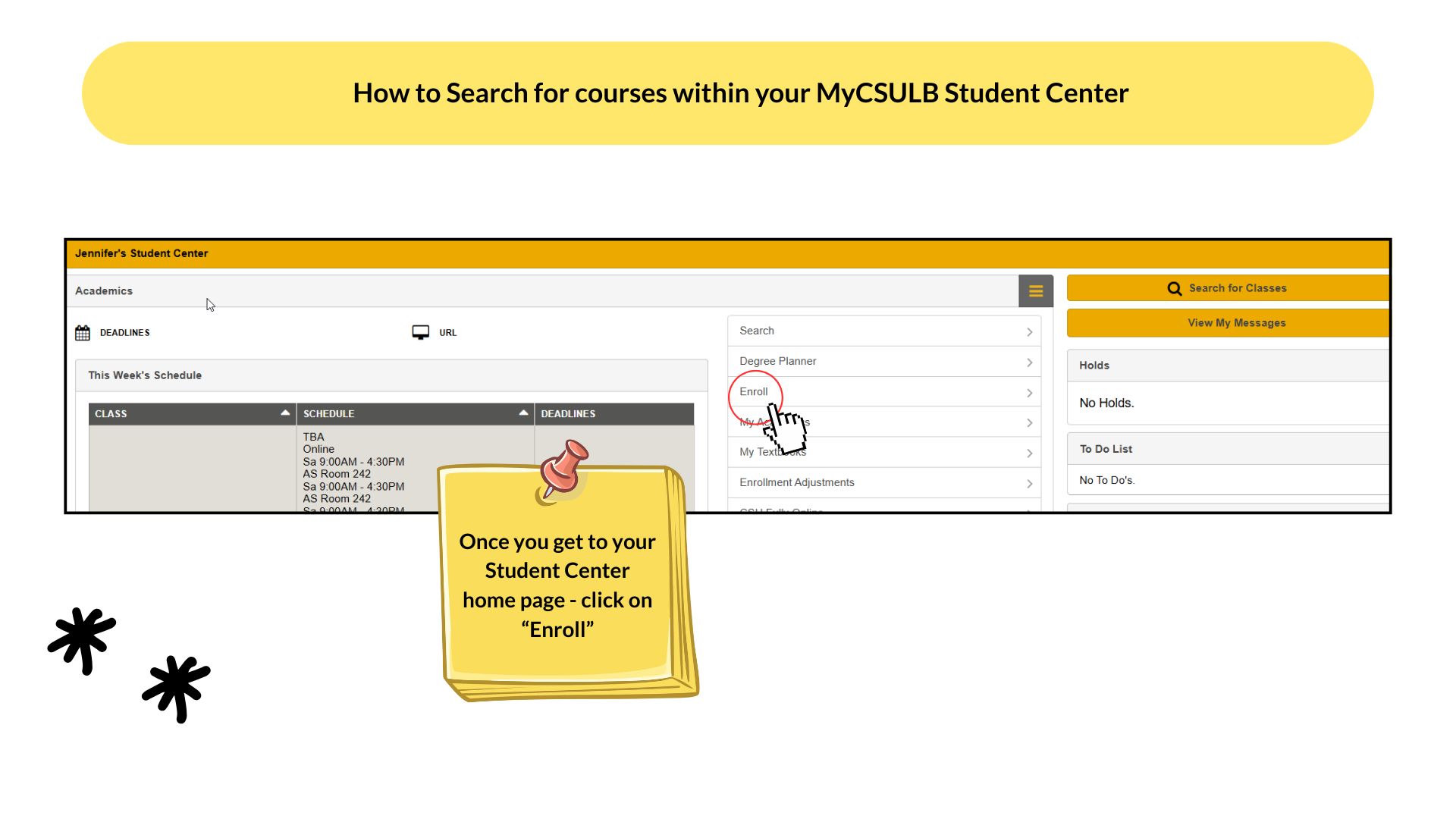
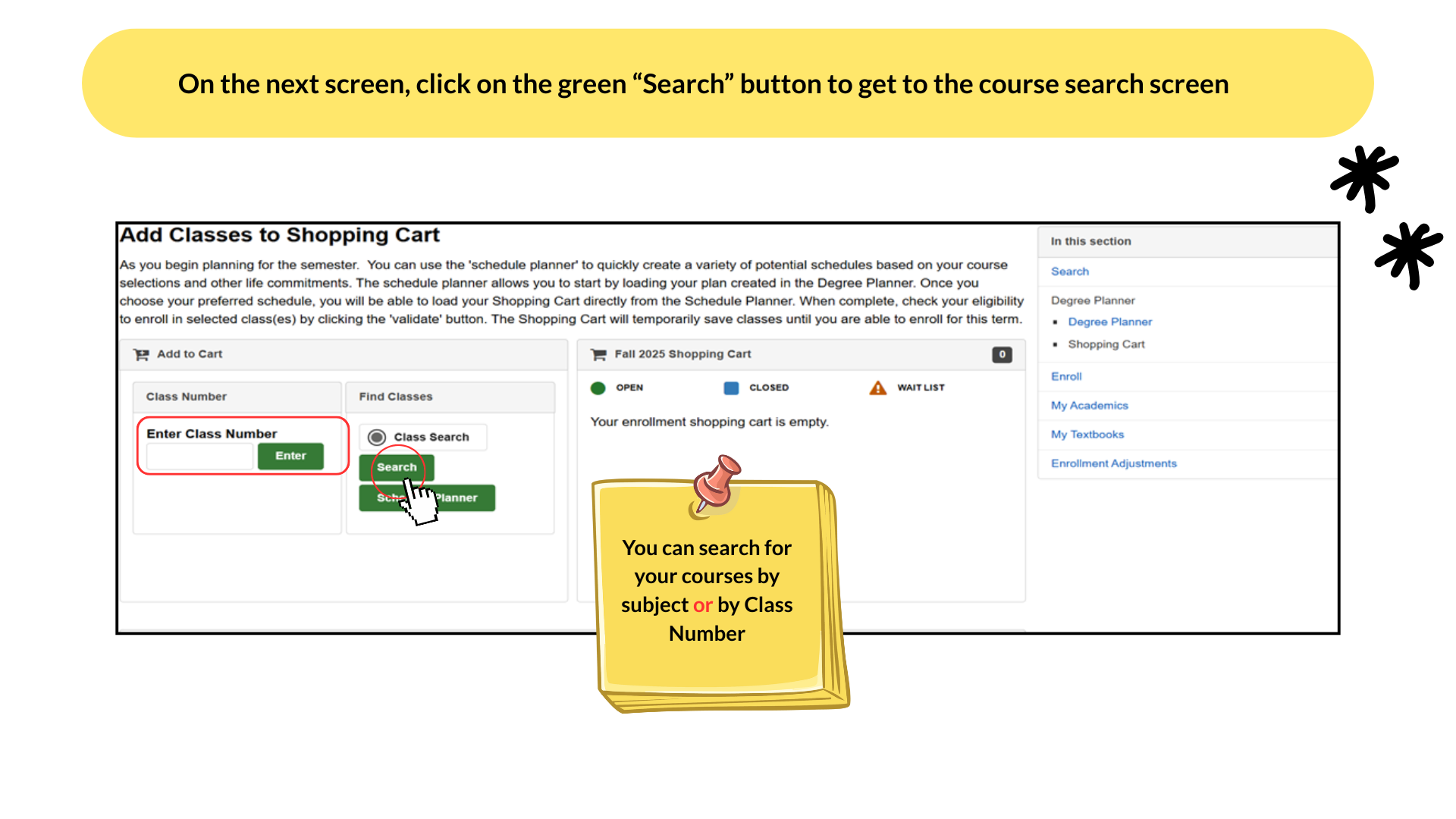
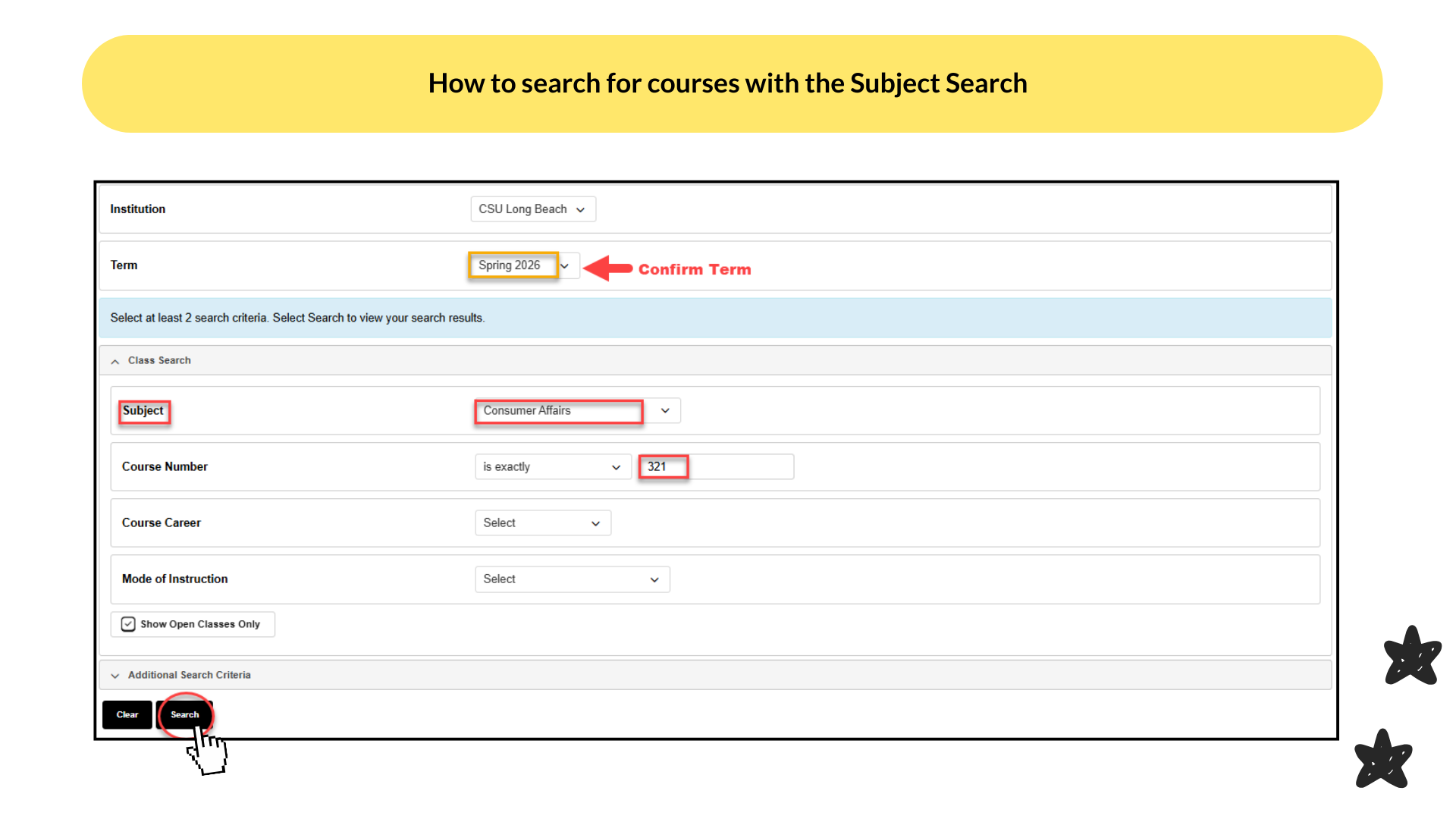
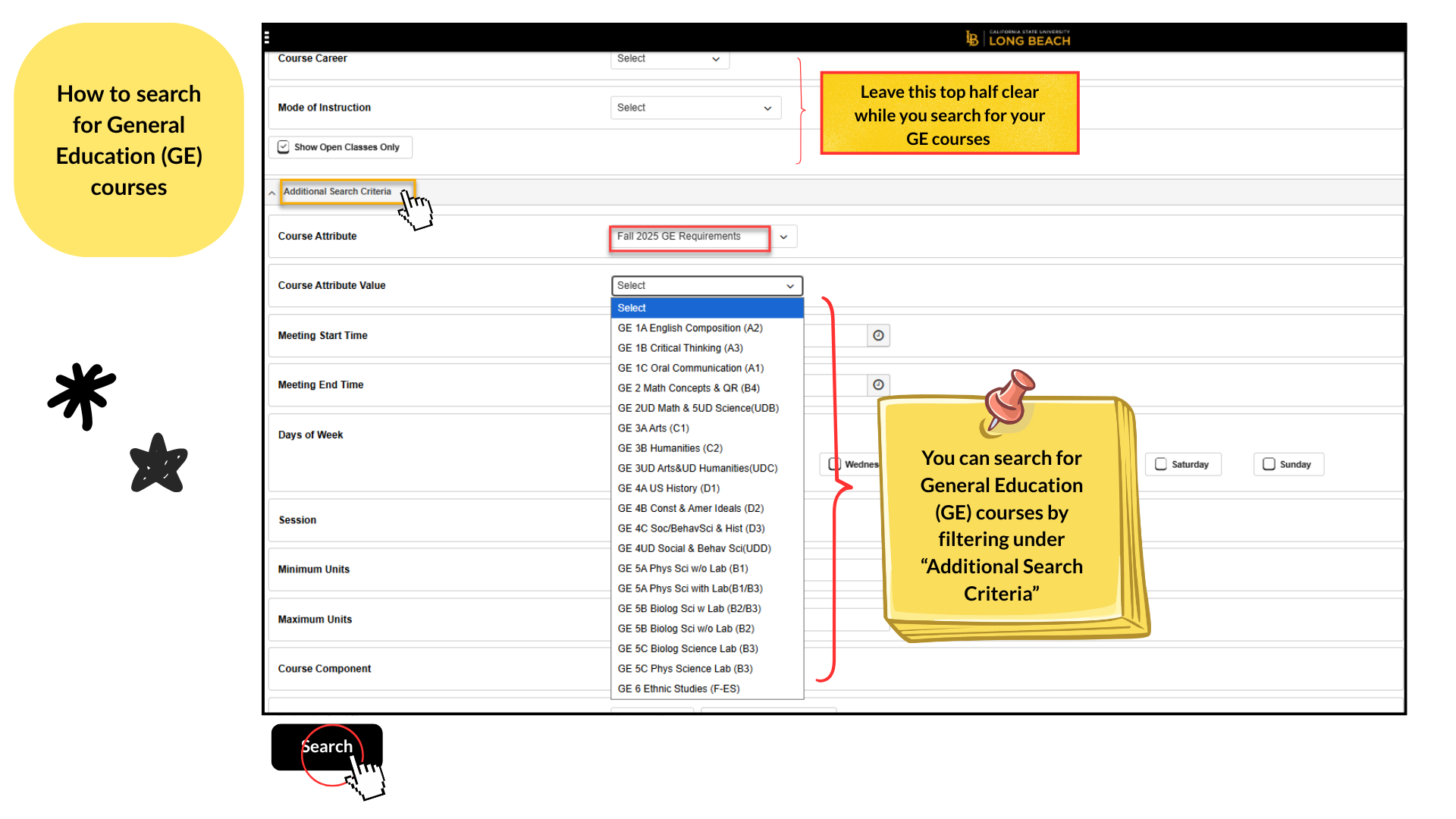
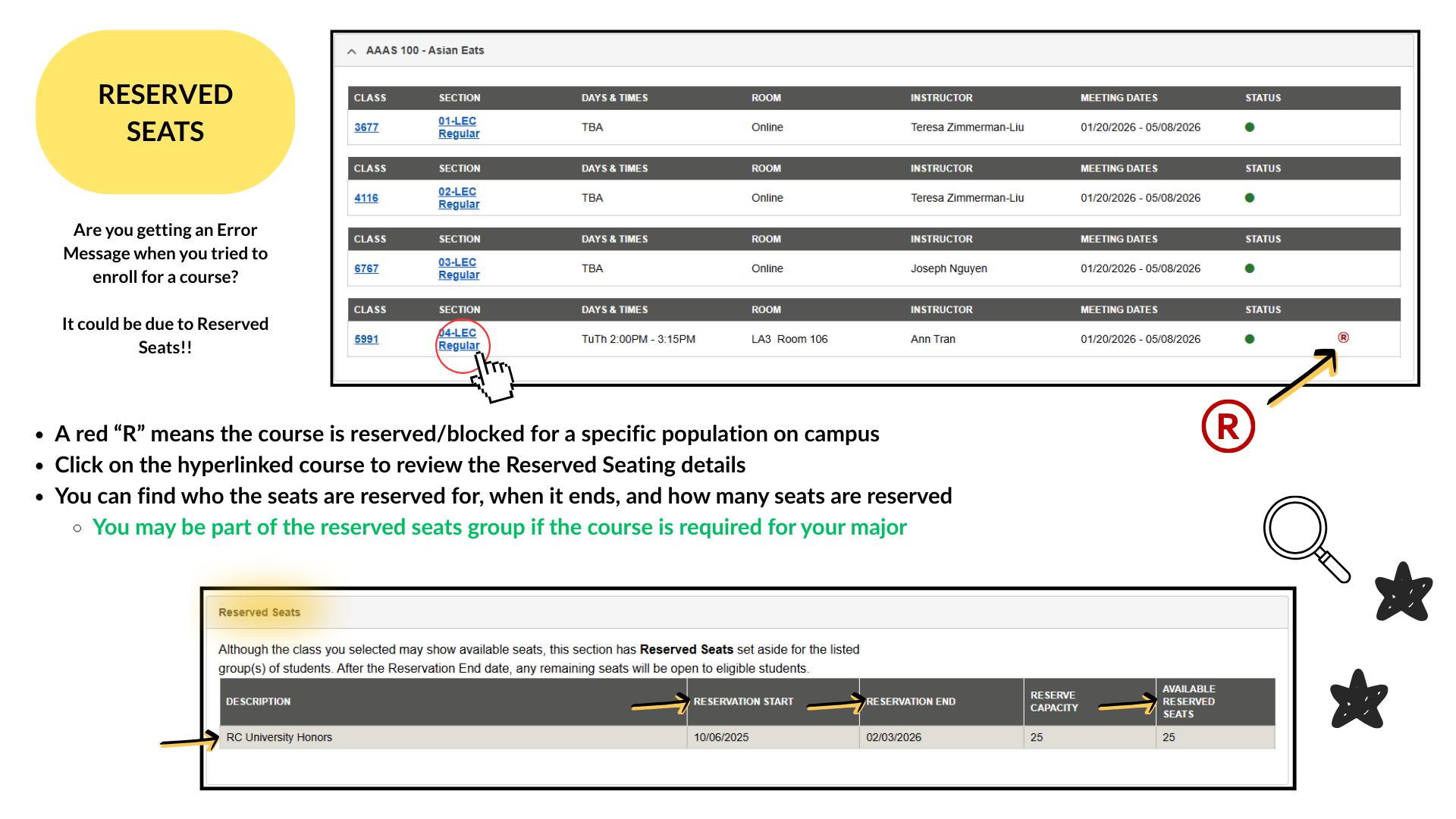
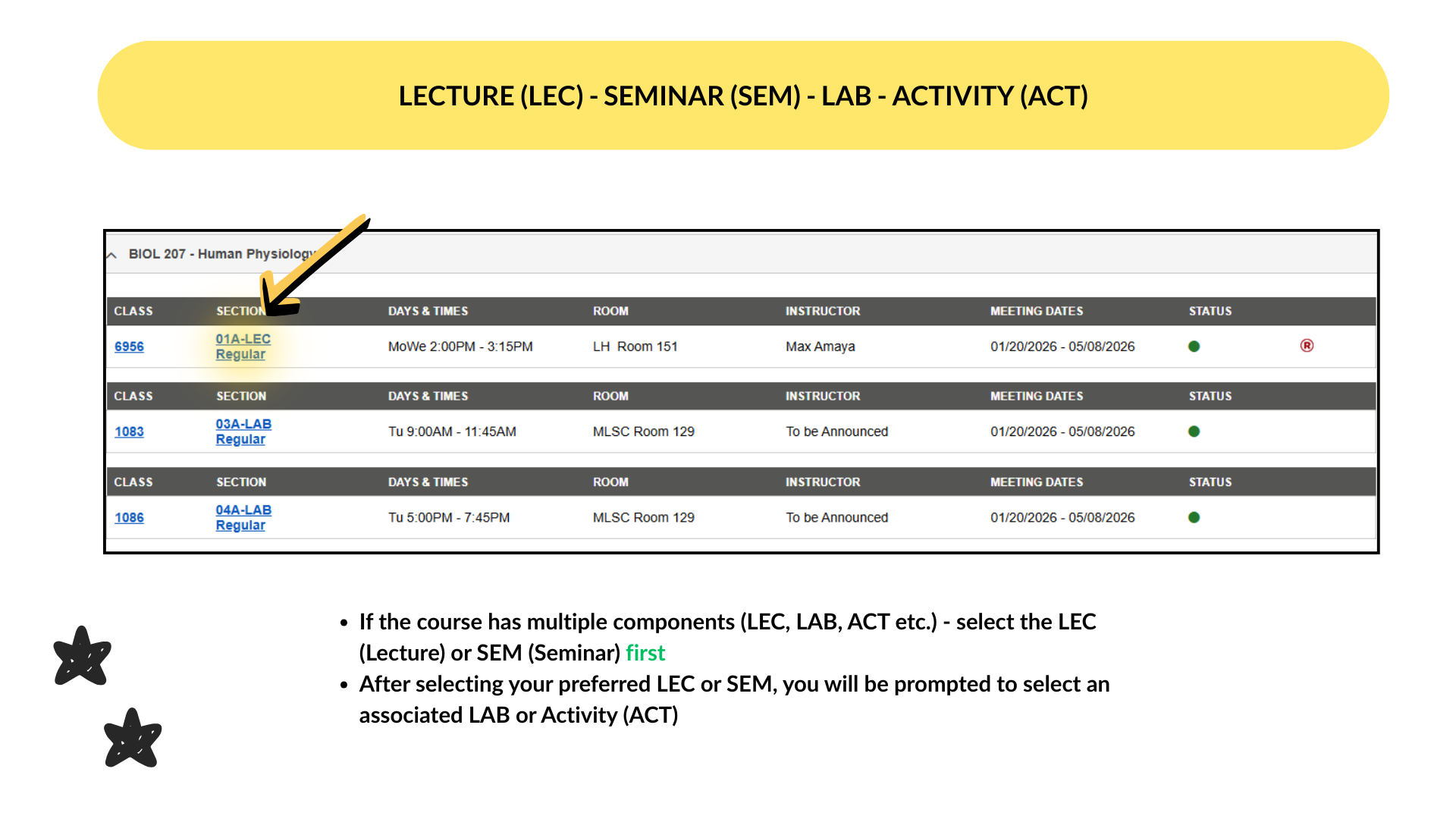
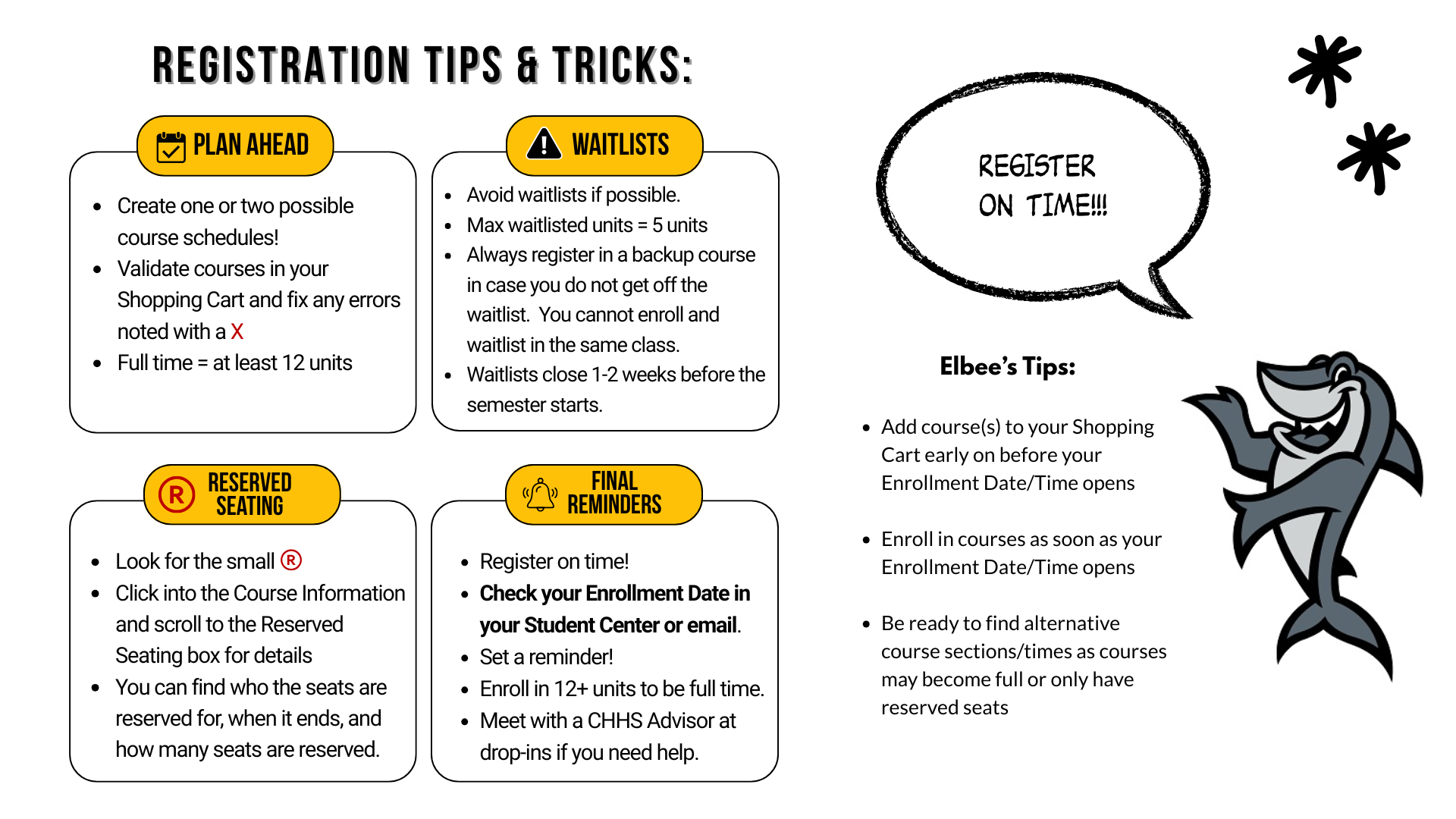
It is important to ensure you are enrolling in the correct GE courses. Please review this video to learn how to search for classes using the Schedule of Classes website and your MyCSULB Student Center. We also have step-by-step instructions you can download.
- CSULB Summer 2026 Schedule of Class
- Assist.org - Use this to find which courses at a California Community College will transfer to CSULB
- Assist.org Tutorial (Youtube Video)
- Academic Requirements Report Tutorial (YouTube Video)
- Basic Needs Program
- Beach Wellness
- Chemistry Placement for CHEM 111A
- CHHS Career Options = Tips from Faculty and Exploration
- CHHS Lower Division Worksheets
- Career Development Center
- Counseling and Psychological Services
- CSULB Events & Student Organizations
- Dream Success Center
- Financial Aid and Scholarships
- Schedule of Classes
- Student Cultural Resource Centers
- Tutoring at CSULB
- Veterans Services
