Swivls
Meet the Swivls
The Swivls are available to support College of Education Student Teachers with recording lessons for clinical practice and the CalTPA.
These are optional tools. They are not a requirement. Video can also be captured using your own device for all credential requirements. These kits will allow for better video and an option of AI-powered reflections and feedback with the Swivl M2.
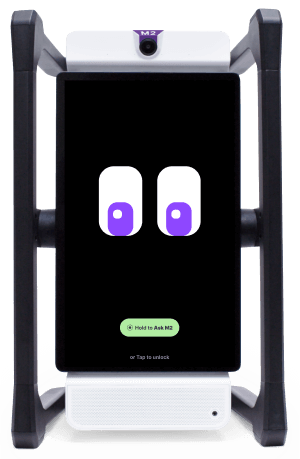
Kit A: Swivl M2 (includes Swivl base, marker, charger, and case)
Dimensions of kit in Carrying Case: 22 x 14 x 8.5 inches
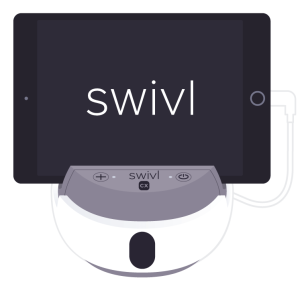
Kit B: Swivl CX (includes Swivl base, markers, carrying case, charger/accessories, and optional iPad/tripod)
Dimensions of Kit: 11.5 x 6 x 4 inches
Dimensions of Tripod: 30 inches ( 2.5 feet)
Swivl M2: Kit A
- Larger kit
- Requires wifi access
- AI features, including lesson feedback, custom reflections, translation, and more
- Single wireless microphone plus integrated microphone & speakers
Swivl CX: Kit B
- More lightweight and compact
- Optional iPad, or you can use your own phone/tablet
- Optional tripod
- Multiple wireless microphones to record different audio tracks, such as student groups collaborating
- Can be used with or without wifi
In order to be eligible to check-out a Swivl:
- Review all of the training materials for your selected Swivl kit.
Complete the corresponding Quiz with 100%. The Quiz can be taken multiple times, if necessary.
- Save the email from the Completed Quiz as a PDF.
Complete a Docusign Agreement with an upload of the completed Quiz Certificate(s).
IMPORTANT: please be sure to attach the Quiz Completion PDF for one or both Swivl kits, or you will need to redo the Docusign.
- Come to the Student Success & Advising Center (SSAC) in EED-18 to pick up and return your selected Swivl Kit with a 3, 5, or 7 day checkout.
Swivl M2 Required Training
Swivl M2 QuickStart Course: Complete all five modules
During the course, you will create an account at https://mirrortalk.ai/register using your CSULB email.
IMPORTANT: you MUST use your CSULB email per campus security requirements and in order to get connected with our custom AI feedback.
Additional Training & Resources
How M2 Works: Overview of M2 and functionality in the classroom.
Step-by-Step for the M2: Quick start guide to getting the M2 up and running
QuickStart Guide for the MirrorTalk Software: Additional support for the reflection features
- What Can M2 Do?
- Why Chat with M2?: Reflect, ask questions, or set goals both before and after your lesson.
- Get Started with Reflectivity
- M2 eLearning Resources
Letter for your Mentor/Cooperating Teacher about the Swivl M2
Required Quiz
After reviewing the above material, please take the following quiz. You must receive 100%, and you can take multiple times if necessary.
Swivl CX Required Training
Please Note: The Swivl CX is referred to as the Swivl Robot in some training content.
Swivl CX QuickStart Course: Complete all five modules
During the course, you will create an account at https://cloud.swivl.com/login using your CSULB email.
IMPORTANT: you MUST use your CSULB email per campus security requirements
Optional Training & Resources
- Working with Swivl Videos: Additional support for the video features
- Swivl Help Center: Swivl Help and Support
- Classroom Display Setup and Tracking: The following recommendations are for both C-Series and CX robots.
- Quickstart Resources for Swivl Robot: Learn how to connect your robot, record your first video, and update firmware.
- CX Robot + M2 App Integration: Teachers can now launch the M2 app directly from the Swivl Capture interface while connected to a Swivl CX Series Robot. This creates a smoother classroom workflow: the Robot handles audio, video can be recorded during the session, and M2 app provides real-time AI guidance.
After reviewing the above material, please take the following quiz. You must receive 100%, and you can take multiple times if necessary.
After reviewing and completing training materials, if additional support is needed, our CED Technology Integration SAs are available to support you!
Use this form to set up a time to meet online or in person:
If you need support outside of these times, fill out this form with your availability and someone will get back to you!