Apostle Business Ideation Challenge
The Apostle Business Ideation Challenge is a fast-pitch business competition for CSULB students, supported by the John and Helen Apostle Foundation. Teams develop a business idea and pitch it to judges, with top teams advancing to a live final round. Compete for a $2,500 Grand Prize and $1,000 Honorable Mention awards.
Key Dates
Tuesdays, Nov 3, 10, 17 — Lean Model Canvas prep classes, 6–9 pm, CPaCE 100C (required for non-business majors and design students)
Monday, Nov 30, 5 pm — Round 1 video pitches due
The video submission link will be shared with eligible teams. Questions? Email csulb-iie@csulb.edu.
Tuesday, Dec 8 — Finalists announced (15 teams), followed by a mandatory SparkRockets session for finalists, CPaCE 100C.
Tuesday, Dec 15, 6–9 pm — Live Pitch Competition, Horn Center 120
Prizes
Two Grand Prizes: $2,500 each
Five Honorable Mentions: $1,000 each
The challenge runs in two rounds:
Round 1 — Video Pitch (all teams)
- 2-minute pitch maximum (don’t go over)
- Record in Zoom using the “over the shoulder” presenter layout, in your real voice
- Three slides:
- Team name and logo
- Problem and solution
- Value Proposition
Round 2 — Live Pitch Competition (15 finalists).
- Finalists are announced Tuesday, Dec 8, and must attend a mandatory SparkRockets session that evening in CPaCE 100C.
- On Tuesday, Dec 15, finalists pitch in person from 6–9 pm in Horn Center 120, competing for the $2,500 Grand Prize and $1,000 Honorable Mention awards.
Prep Classes
- Lean Model Canvas class
- Tuesdays, Nov 3, 10, 17 · 6–9 pm
- CPaCE 100C (near the Outpost Grill)
- Required for non-business majors and design students. Sign in at each class.
Your Round 1 video must be recorded in Zoom using the “Over the shoulder” presenter layout, so judges can see both you and your slides.
- Open your slides. Have your three-slide presentation open and ready on your computer.
- Start a Zoom meeting on your own, with your camera and microphone on.
- Start recording. Click More (•••) in the toolbar, then Record.
- Tip: Do a quick test recording first to check your lighting, sound, and that your slides are readable.
- Share your screen. Click Share and select your presentation window.
Choose “Over the shoulder.” In the Presenter layout panel, select Over the shoulder so your video appears in front of your slides.
Image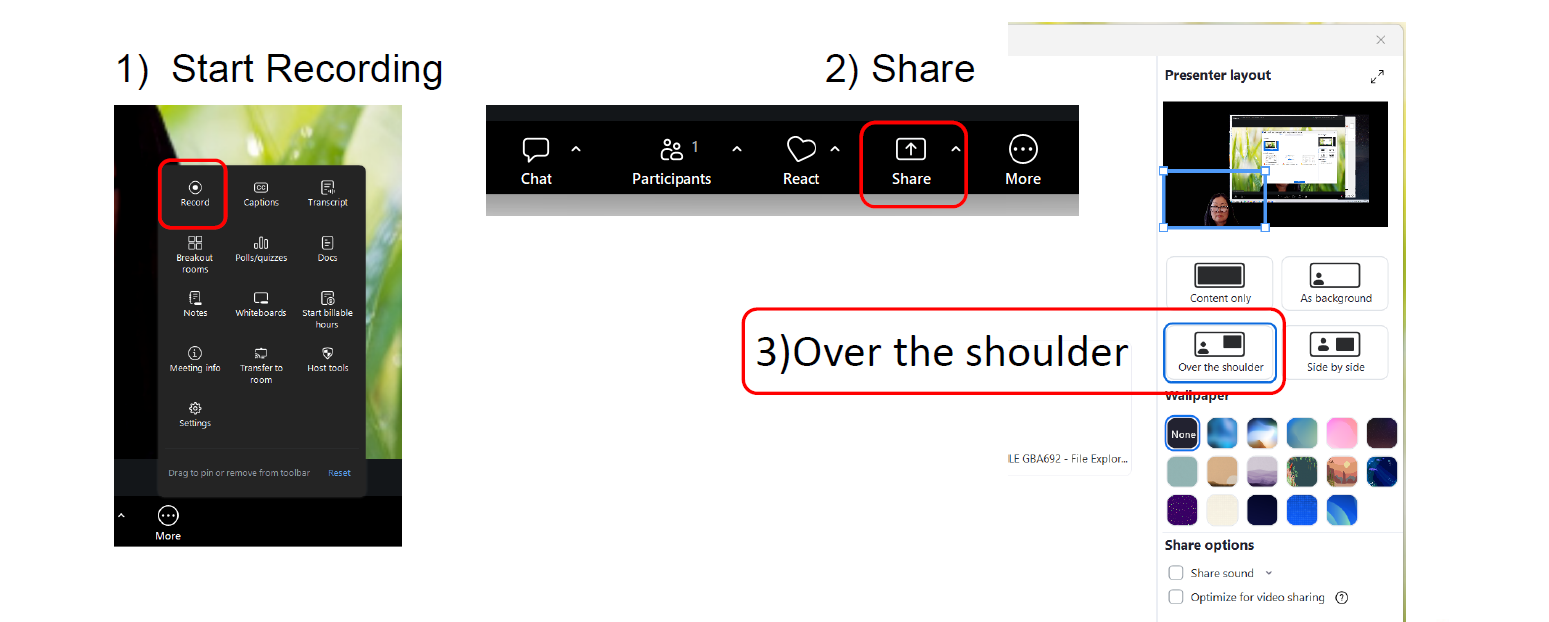
- Pitch. Present in your own voice and keep it to 2 minutes or less.
- End the meeting and get your video file. Stop sharing and end the meeting. Then save the recording to your computer as a video file:
- If you recorded to your computer: wait for Zoom to finish converting. The MP4 file saves to your Zoom folder (usually Documents → Zoom).
- If you recorded to the cloud: open your recording in the Zoom web portal and click Download to save the MP4 file to your computer.
- Submit. Upload the downloaded MP4 file to the Google Drive folder link shared by your professor, by 5 pm, Monday, Nov 30.
Important: Upload the actual video file. Do not submit a Zoom share link, a cloud recording link, or a passcode. Submissions sent as links or with passwords will not be accepted.
Tip: Before uploading, open the downloaded file to make sure it plays and is under 2 minutes.
- The team lead must be a currently enrolled student at CSULB, the team can include a member from outside the CSULB community
- Must have participated in:
- Apostle Incubator
- Apostle Enterprise Lab
- Select Design Classes (reach out to csulb-iie@csulb.edu with questions)
- Non-business majors and design students must attend the Lean Model Canvas prep classes
You're welcome to use generative AI tools (such as ChatGPT, Copilot, or Dall-E) for the following parts of your project:
- Developing your survey and customer interview questions
- Researching your topic, customers, and market
- Creating mock-ups of your application
- Developing your video pitch (for example, using Copilot)
Important: What AI Can't Do
Generative AI tools may not be used to generate your business idea or solution. Identifying the problem, generating ideas, and developing your solution must be the original work of you and your team.
Using AI for anything beyond the uses listed above is a violation of CSULB's Plagiarism/Academic Integrity Policy. Any approved AI use must be identified and referenced in your submission. Your video pitch must use your own voice. AI-generated voiceovers are not permitted.