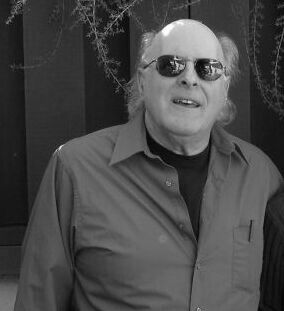

• Edwin L. (Ted) Woollett
  • Professor Emeritus, Physics & Astron., CSULB
  • Ph.D. - Kansas State Univ, 1965
  • Computational Physics
ted woollett pic
curlews

MAXIMA BY EXAMPLE

Maxima is a freely available computer algebra system which is an open source cousin of the commercial Macsyma CAS, with an energetic development team of volunteers and an email "mailing list" which provides an effective and friendly means of getting and providing advice on the practical use of Maxima.


Maxima by Example is a series of tutorial notes which include many examples of the power of Maxima. Designed for the new user, we include some "nuts and bolts" suggestions for working with the Maxima software, especially for the Windows user. The posted files use 12 point type, which makes for easier reading at the computer screen, but costs more to print. If there proves to be a sufficient demand for pdf files in 10 pt typeface (and/or postscript files), I will try to add that alternative.

Reading these notes on your computer makes more sense than printing them out, although you may want to print out the first page which has the table of contents. It is easier to keep a live set of notes up to date than a book.


On reading these pdf files: If you are using the free Adobe Reader, you may get irritating panels (depending on your version) at file launch with a message such as "Reading untagged document...this document must be processed for reading...". You can click the "cancel" box and hopefully avoid the "temporary tagging" process which is a waste of time usually. (Don't check the little box which says "do not show this dialog again", since then the program just starts the temporary tagging process without that panel with the cancel box!!)

The free Adobe pef reader has grown to be a massive program, with all kinds of bells and whistles the average user doesn't need, and also the typeface seems poor on the screen.

Perhaps a better pdf reader alternative (for the Windows xp user) is the relatively new Sumatra free and open source pdf reader which is a small and fast program with better looking typeface on my screen. You can read a review here. Or you can just go directly to the download page. The best view is achieved by using the menus items: View, continuous; Zoom, fit width. Make it your default pdf viewer for much faster work when clicking on a pdf file.


Chapter 1, Getting Started

  1. --mbe1start.pdf: April 10, 2008, Maxima 5.14, 28 pages
  2. --mbe1start.txt, cut and paste code: April 9, 2008, Maxima 5.14

Chapter 1 sections: 1. Introduction, 2. Expressions in Maxima, 3. List Creation and Manipulation in Maxima, 4. Data Files: Read, Write, Fit and Plot, 5. Latex Figures from Maxima plot2d


Chapter 2, Algebra, Part 1 -----pdf file: Mar. 17, 2008, Maxima 5.14, 31 pages

Chapter 2 sections: 1. Introduction, 2. Simplifying Expressions, 3. Factoring Expressions, 4. Making Substitutions


Chapter 3: Algebra, Part 2 -----pdf file: Mar. 9, 2008, Maxima 5.14, 27 pages

Chapter 3 sections: 1. Extracting Parts of an Expression, 2. Extracting Parts of a Complex Expression, 3. Evaluating Trigonometric Functions, 4. Expanding and Simplifying Trig Expressions, 5. Evaluating Summations


Chapter 4: Solving Equations

  1. --mbe4solve.pdf : April 8, 2008, Maxima 5.14, 47 pages
  2. --mymnewton.mac: April 8, 2008, Maxima 5.14
  3. --mbe4solve.txt, cut and paste code: April 9, 2008, Maxima 5.14

Chapter 4 sections: 1. One Equation or Expression: Symbolic Solution or Roots (solve), 2. One Equation Numerical Solutions: allroots, realroots, find_root, 3. Two or More Equations: Symbolic and Numerical Solutions (linsolve, linsolve_by_lu, eliminate, newton, mnewton, implicit_plot, draw package implicit).

Chapter 4 provides numerous examples of using Maxima tools to solve equations. Extra attention has been given to matrix methods for sets of linear equations, using linsolve_by_lu. The chapter ends with an interactive work session implementing a homemade "mymnewton" which is followed by creation of a homemade mymnewton function which has at its core the linsolve_by_lu matrix based function. Readers can download the text file "mymnewton.mac" and experiment with the code and experiment with adapting the code for their own uses.

Many of the examples in Chapter 4 are related to common questions sent in to the "Maxima Mailing List".


Ted Woollett was active in teaching and research for 35 years (beginning in 1966) as a faculty member in the Physics and Astronomy Department at California State University, Long Beach. His research included peer reviewed work in theoretical plasma physics, non-equilibrium thermodynamics, theoretical xray spectra, high energy nuclear physics, and physics & society issues.


Over the course of his service in teaching, Ted created a freshman physics course "Man and Energy" which dealt with the physics side of societal issues related to energy use and the environment. This popular course offered during the 1970's used a different text each semester the course was taught, and even included one semester devoted to physics of the health implications of radiation.


Physics and astronomy courses taught to undergraduates and graduate students included Elementary Particle Physics Phenomenology, Special Relativity, General Relativity, Introduction to Astrophysics, Computational Physics, Plasma Physics, Statistical Physics, Thermodynamics, Electricity and Magnetism, Quantum Mechanics, Classical Mechanics, and Mathematical Methods of Physics.


Ted is now living in San Luis Obispo, on the Central Coast of California, and is developing a series of tutorial/lecture notes which describe in detail how one can use the freely available computer algebra system Maxima (Macsyma) to explore computational physics problems. These notes will be posted here in pdf form , together with text (machine readable) source code.


His contact email address is now: woollett@charter.net

CSULB PHYSICS DEPT. HOME